
Many students know they should organize a course early, but they still delay it because the setup feels heavy. The syllabus exists, the chapters are listed somewhere, and the exam program is technically available, but turning that information into a real study structure feels like one more project before the real studying even begins.
That setup friction matters more than it seems. When a course never gets structured, everything that comes after becomes looser and more fragile. Notes float without context, files pile up in generic folders, and revision starts from memory instead of from a visible course map. Importing a syllabus outline is useful because it removes much of that initial friction. Instead of building the structure from zero, students can start from the outline that already defines the course.
Why setup speed matters in course organization
Students usually lose organization long before exam week. The real drift happens during the semester, when the course exists only as a loose collection of materials. One lecture note goes into a notebook, a PDF goes into a drive folder, a useful explanation goes into a chat, and the syllabus remains a separate document that nobody uses as the actual navigation system.
That is why the first setup decision matters so much. If the course structure is quick to create, students are far more likely to build it while the semester is still active. If the setup feels laborious, they postpone it until revision, and by then the structure has to rescue a pile of scattered material instead of guiding the course from the start.
Importing an outline helps because it changes the threshold. It turns course setup from a manual reconstruction exercise into a faster translation task. The student is no longer inventing the map. They are refining one that already exists.
What an imported outline should actually become
The goal is not to paste a syllabus into a tool and leave it there untouched. The goal is to transform the outline into a structure students can work inside. That means chapters should become navigable topics, subtopics should stay visible where they matter, and the result should be clean enough that notes, files, and questions can attach to it naturally over time.
This is the difference between storing the syllabus and using the syllabus. A stored syllabus remains reference material. A usable course structure becomes the backbone for the rest of the workflow. It helps answer practical questions quickly: which chapters still have no notes, where the lecture files for this topic belong, and which parts of the course are still generating unresolved doubts.
Not every imported outline will be perfect on first pass, and it does not need to be. It needs to be useful enough that students can navigate the course without rebuilding it in their head every time they study.
Why outline import is stronger than manual setup alone
Manual setup is still valuable, especially when a syllabus is messy or when a student wants to rename topics in a way that better fits revision. But starting from an outline often gets students to a workable structure much faster. That speed matters because momentum matters. The faster the course becomes visible, the faster the rest of the materials can start attaching to something stable.
It also reduces the temptation to keep working in disconnected spaces. Once students have a course map early, they are more likely to store files in the right place, link notes to the correct chapter, and save questions where they can be revisited later. In other words, outline import helps with much more than convenience. It changes the odds that the whole system will actually be used.
A Supastudy workflow example
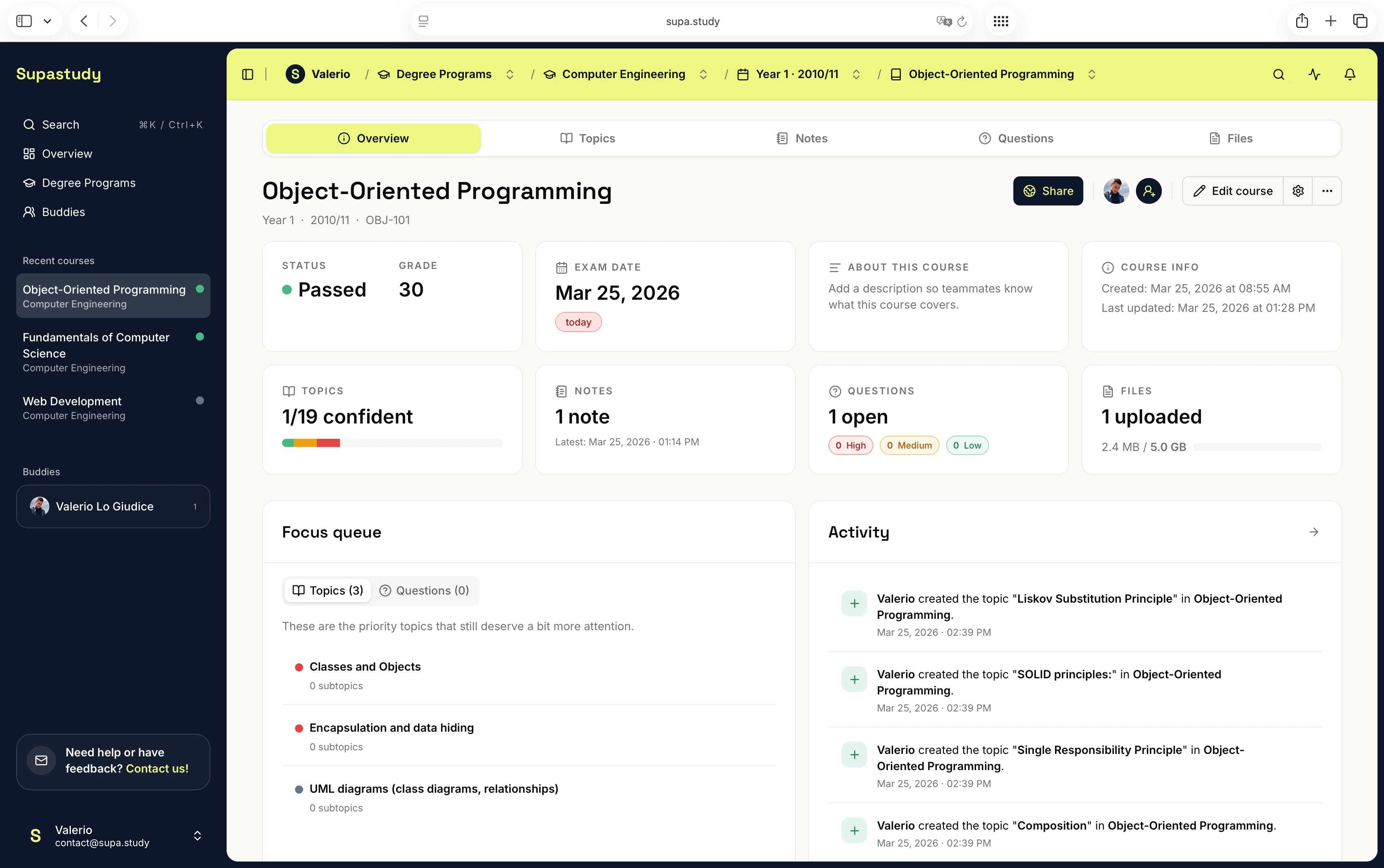
In Supastudy, one practical workflow begins by creating the course and pasting the syllabus outline into the topic import flow. The imported structure then becomes a first draft of the topic tree. From there, the student reviews the result, cleans up any awkward chapter names, merges or splits topics where necessary, and makes sure the structure matches how they expect to revise the course later.
Once that structure is in place, the course becomes much easier to build out. Lecture files can be uploaded and linked to the relevant topics. Notes can be attached to one or more chapters. Open doubts can be saved as questions under the exact area that generated them. By the time exam planning starts, the student is not beginning with a blank page. They are working with a course that already has shape.
That is the real advantage. Outline import is not the end of the workflow. It is the move that makes the rest of the workflow easier to sustain.
When to edit the imported structure by hand
An imported outline should be treated as a draft, not as untouchable truth. Some syllabi are written for administration rather than for study, which means the official wording may be awkward, too broad, or too granular. Students should still feel free to simplify names, reorder sections where it improves comprehension, or split a huge topic into smaller units that are easier to revise.
The best version is usually the one that balances official course logic with revision practicality. Too much fidelity to the syllabus can make the structure clumsy. Too much customization can make it hard to compare the structure back to the official exam program. The useful middle ground is a structure that still reflects the course while being readable enough to guide everyday study.
Common mistakes when importing a syllabus
One mistake is assuming the import step finishes the work completely. It does not. Students still need to connect the rest of their materials to the imported structure. Another mistake is importing a very long outline and never cleaning it, which creates a topic tree that looks comprehensive but feels too noisy to use in practice.
Students also run into trouble when they import the outline but keep their notes and files elsewhere. The benefit of the import only appears when the structure becomes the main home for the course. If the tree exists but the materials stay in unrelated tools, the setup has not really solved the retrieval problem.
What to read next
If you want the broader course-building workflow, read How to Turn a Syllabus Into a Study Plan. If your next challenge is linking the right study material to the imported topics, read How to Organize Lecture Slides, PDFs, and Past Papers for One Exam. If you want to make notes more useful inside the structure, go to How to Link Notes to the Right Chapter So Revision Is Faster. For the broader product context, What Is a Study Planner for University Students? is the best starting point.
Final takeaway
Importing a syllabus outline matters because it lowers the cost of building a real course structure. Once the outline becomes a topic tree, the rest of the course can stop floating in disconnected tools and start attaching to something stable.
If you want to try that workflow with your next course, you can start for free. If you want to understand collaboration, sharing, and plan details before setting up the course, visit the FAQs or the pricing page.