
Students often think they are organized because all the files exist somewhere. The lecture slides are in one folder, the PDF readings are in another, the past papers are buried in a downloads stack, and a few annotated summaries live inside a notes app that feels “temporary” until revision starts. Then the exam gets close, and the real problem appears. The issue was never whether the material existed. The issue was whether the material could be retrieved in the order the exam actually demands.
That is why one exam can feel chaotic even when the student has spent weeks collecting resources. File storage and study organization are not the same thing. Storage answers the question, “where did I put this document?” A real exam workflow answers a harder set of questions: which chapter is this file for, what note explains it, which past paper belongs to this part of the syllabus, and what is still missing before the exam date arrives?
Why file-type folders stop working during revision
The most common setup is deceptively reasonable. Students create folders called “slides,” “PDFs,” “past papers,” and “notes,” then keep adding resources as the semester moves forward. In the moment, that feels efficient because it is quick and familiar. The trouble is that the exam itself is not organized by file type. It is organized by topics, chapters, and recurring questions.
By the time revision begins, students rarely think, “I need the PDF from week five.” They think, “I need everything I have on renal transport,” or “I need the files for administrative law remedies,” or “I need the past paper questions that match Chapter 6.” A file-type structure forces the student to reconstruct the chapter from several places every single time. That extra reconstruction is tiring, and it gets worse when some files were annotated, some were renamed badly, and some were saved twice in different places because nobody wanted to lose them.
This is also why past papers create more confusion than they should. They are useful precisely because they connect back to exam topics, but in a flat folder system they become just another pile. Students know the material is somewhere, but not how it fits into the logic of the course.
A better system starts from the exam, not from the file extension
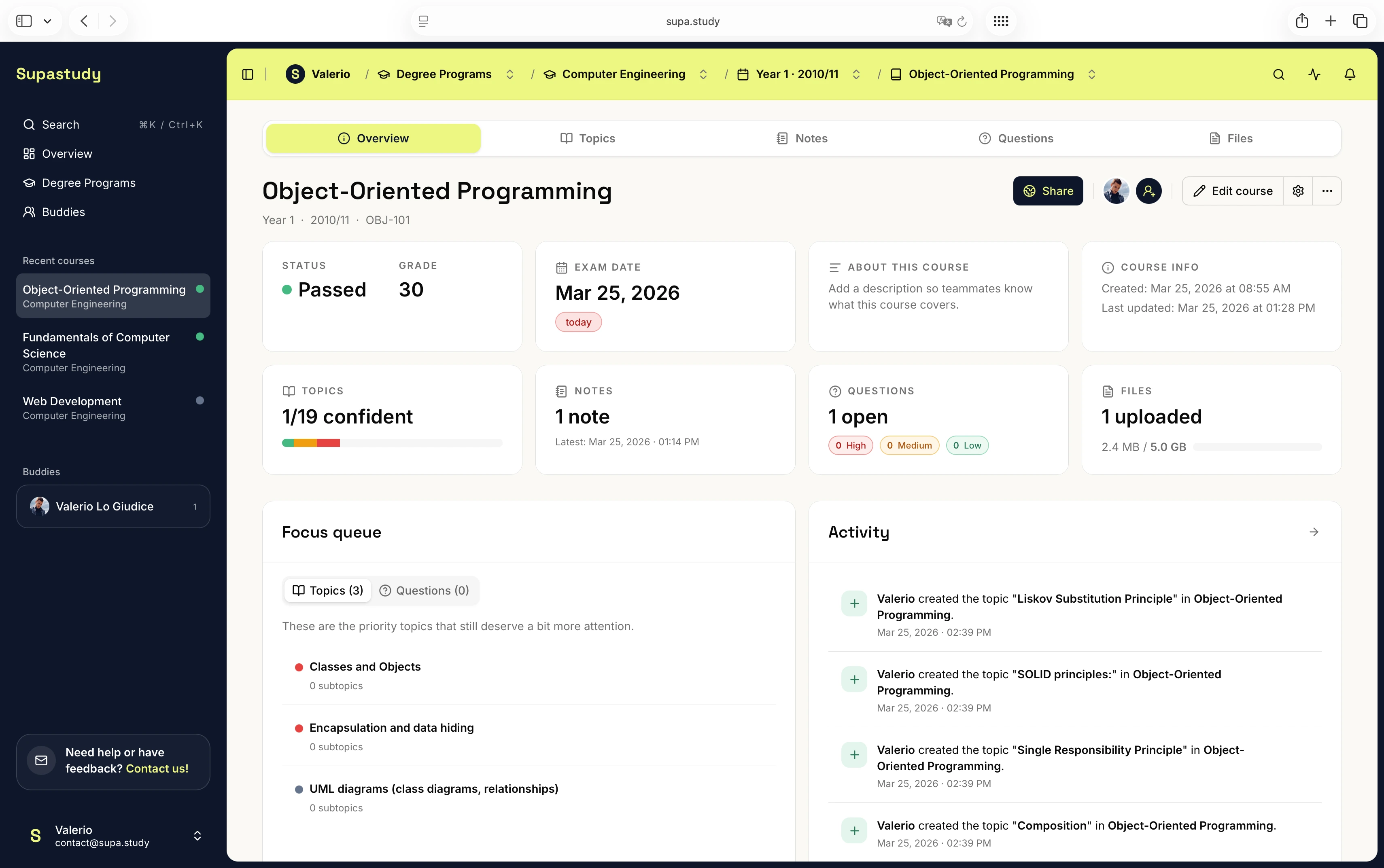
The cleaner approach is to let the course structure become the main container, then place files inside that structure. Once the course is broken into topics and subtopics, lecture slides, PDFs, and past papers stop being isolated assets and start acting like supporting material for the exact part of the syllabus they explain.
That change has a big effect on revision. Instead of opening a “past papers” folder and hunting for relevance, the student can open the topic itself and move outward from there. The chapter becomes the starting point. That chapter can then reveal the note, the linked lecture deck, the related PDF reading, and any question or past-paper item that belongs there.
This does not mean every resource has to be duplicated across ten places. It means the resource should have context. Context is what turns a stored file into a usable study asset.
What lecture slides, PDFs, and past papers each do best
Lecture slides are often the quickest way to recover the sequence of what was taught, but they are rarely enough on their own. They need to be connected to notes, summaries, and difficult concepts. PDFs and readings are useful because they add depth and clarity, especially for topics that the lecture only touched briefly. Past papers are different again. Their value is diagnostic. They show how the course material is likely to be asked, which topics recur, and where a student’s understanding is still too passive.
The mistake is to treat all three resource types as interchangeable files in one broad archive. They play different roles, and a revision system becomes stronger when those roles stay visible. The slide deck can introduce the chapter, the PDF can deepen it, and the past paper can test it. Once that relationship is visible, revision becomes more strategic and less repetitive.
A Supastudy workflow example
In Supastudy, one practical setup starts by building the course topic tree from the syllabus, then creating folders inside the course for the main file types students already use. Lecture slides, readings, and past papers can be uploaded there, but the important step is linking each item back to the topic it supports. A student preparing for physiology, for example, might link two lecture decks and one reading packet to the cardiovascular chapter, attach a summary note to the same area, and save one unresolved question that still needs clarification before the exam.
That same flow helps with past papers as well. Instead of treating them as one disconnected stack, students can use them as chapter-specific revision material. One paper might be broadly relevant across several units, while another may fit one very specific topic. Inside a course-first structure, that distinction becomes much easier to preserve.
The practical result is that revision starts with the chapter, not with the storage location. That sounds simple, but it removes a surprising amount of friction. Students no longer need to remember the name of the PDF or guess which week the concept appeared in. They can move from topic to material in a much more direct way.
How to avoid turning past papers into another archive
Past papers are especially easy to misuse. Students often collect them late, skim them quickly, then either save them in one generic folder or leave them on a desktop until panic starts. A better pattern is to treat them as part of the same study structure as everything else. If a paper clearly maps to a topic, connect it there. If it contains several useful questions across the syllabus, link it at course level and make sure the relevant topics also hold notes or questions derived from it.
This is where a course workspace is stronger than a basic drive tree. A paper is not just a file to be preserved. It is evidence about what the exam emphasizes. Used well, it helps students see which parts of the course are still too theoretical and which chapters need stronger answers, better notes, or more deliberate review.
Common mistakes that make exam files harder to use
One common mistake is waiting until the exam is close before organizing the files at all. Another is assuming that “having everything downloaded” is the same as being ready. A third is keeping one structure for files and a completely different structure for notes, which forces the student to mentally stitch the course together every time they revise.
Students also lose time when they keep renaming files in inconsistent ways or when they save the same material in several places because they do not trust their own system. Duplication usually signals that the underlying organization is weak. If students feel the need to duplicate a file constantly, the problem is usually not caution. The problem is that retrieval is unreliable.
What to read next
If you want to build the course structure before organizing the files, start with How to Turn a Syllabus Into a Study Plan. If your main problem is that notes are hard to retrieve, read How to Organize Study Notes by Topic Instead of by Date. If you want the more general comparison between a course workspace and a file-first stack, read Supastudy vs Google Drive and Docs for Course Organization. If you are preparing for a fixed exam date, How to Build an Exam Study Plan From Your Syllabus is the next useful step.
Final takeaway
Lecture slides, PDFs, and past papers become much more useful when they stop living as separate piles and start living inside one exam structure. The goal is not to build a more complicated file system. The goal is to make revision easier by keeping every resource attached to the chapter it actually supports.
If you want to try that course-first workflow with one exam, you can start for free. If you want plan details and storage limits first, visit the pricing page or the FAQs.