
Study planner for university students
Plan your courses, organize materials, study with classmates
Supastudy turns each course into a clear study plan with topics, notes, files, and questions, then lets you prepare with classmates in a shared course.




Organize every course in one place
Keep your courses, topics, notes, files, and questions in one place instead of spreading them across different tools.
Study with classmates
Share course materials, add notes together, and keep everyone aligned inside the same shared course.
Built for exam preparation
Turn each syllabus into a clear study plan so you can prepare chapter by chapter, track open questions, and review with more focus before exam day.
Stop studying across five different apps
Most students prepare for exams with a mix of cloud folders, notes apps, PDFs, and scattered documents. The result is duplicate materials, lost questions, and no clear view of what still needs review.
Supastudy gives each course a clear structure, so you can:
Create your first courseBreak a course into chapters and topics
Keep notes attached to the right topic
Store files in structured course folders
Collect questions and answers in one place
Study with classmates without losing structure
Break a course into chapters and topics
Keep notes attached to the right topic
Store files in structured course folders
Collect questions and answers in one place
Study with classmates without losing structure
Map every course before exam prep gets messy
Turn each syllabus into a topic tree. Add chapters manually or import an outline, then link notes, files, and questions to the right topic.
So you can quickly answer questions like:
- Which topics still have no notes?
- Which topics still feel difficult?
- Which files are related to this chapter?
- Which questions are still unresolved?
Course outline
Biochemistry I
Chapter 1 - Cell structure
2 linked notes, 3 questions, 4 files
Chapter 2 - Metabolism
1 linked note, 5 questions, 2 files
Glycolysis
1 linked note, 2 questions, 1 file
Citric acid cycle
No notes yet, 1 difficult question, 1 file
Chapter 3 - Enzymes
No notes yet, 2 difficult questions, 1 file
Chapter 4 - Molecular signaling
3 linked notes, 1 question, 2 files
Second messengers
2 linked notes, 1 question, 2 files
Chapter 5 - Gene expression
1 linked note, 4 questions, 3 files
Course outline
Biochemistry I
Chapter 1 - Cell structure
2 linked notes, 3 questions, 4 files
Chapter 2 - Metabolism
1 linked note, 5 questions, 2 files
Glycolysis
1 linked note, 2 questions, 1 file
Citric acid cycle
No notes yet, 1 difficult question, 1 file
Chapter 3 - Enzymes
No notes yet, 2 difficult questions, 1 file
Chapter 4 - Molecular signaling
3 linked notes, 1 question, 2 files
Second messengers
2 linked notes, 1 question, 2 files
Chapter 5 - Gene expression
1 linked note, 4 questions, 3 files
Built for shared courses, not just solo study
Use Supastudy on your own, then invite classmates when it is time to prepare together in the same course.
Biochemistry I
Constitutional Law
Algorithms and Data Structures
You get the clarity of a study planner with the coordination of a shared course.
Shared course
Members, roles, and invite links
1
Work inside the same course structure2
Contribute notes, questions, and files3
Tag materials to the right topics4
Follow questions and topics5
Stay updated with in-app notifications6
Manage members and roles safelyRoles help shared courses stay organized and safe.
Shared course
Members, roles, and invite links
1
Work inside the same course structure2
Contribute notes, questions, and files3
Tag materials to the right topics4
Follow questions and topics5
Stay updated with in-app notifications6
Manage members and roles safelyRoles help shared courses stay organized and safe.
A study planner built for real university courses
Organize each course by topic
Break a course into chapters and subtopics, import an outline, and track what still needs review.
Keep notes tied to the right topic
Write course notes, link them to one or more topics, and find them again from both the Notes view and the topic itself.
Build a question bank as you study
Save course questions, add answers, mark the best one, and track difficulty so weak spots stay visible.
Manage files in structured course folders
Upload lecture slides, PDFs, and study materials into folders, then link them to the topics they belong to.
Study with classmates in shared courses
Invite classmates into a course, collaborate on notes and materials, and keep everyone working from the same structure.
Follow what matters and stay updated
Follow topics and questions, get notified when something changes, and keep shared courses moving without extra check-ins.
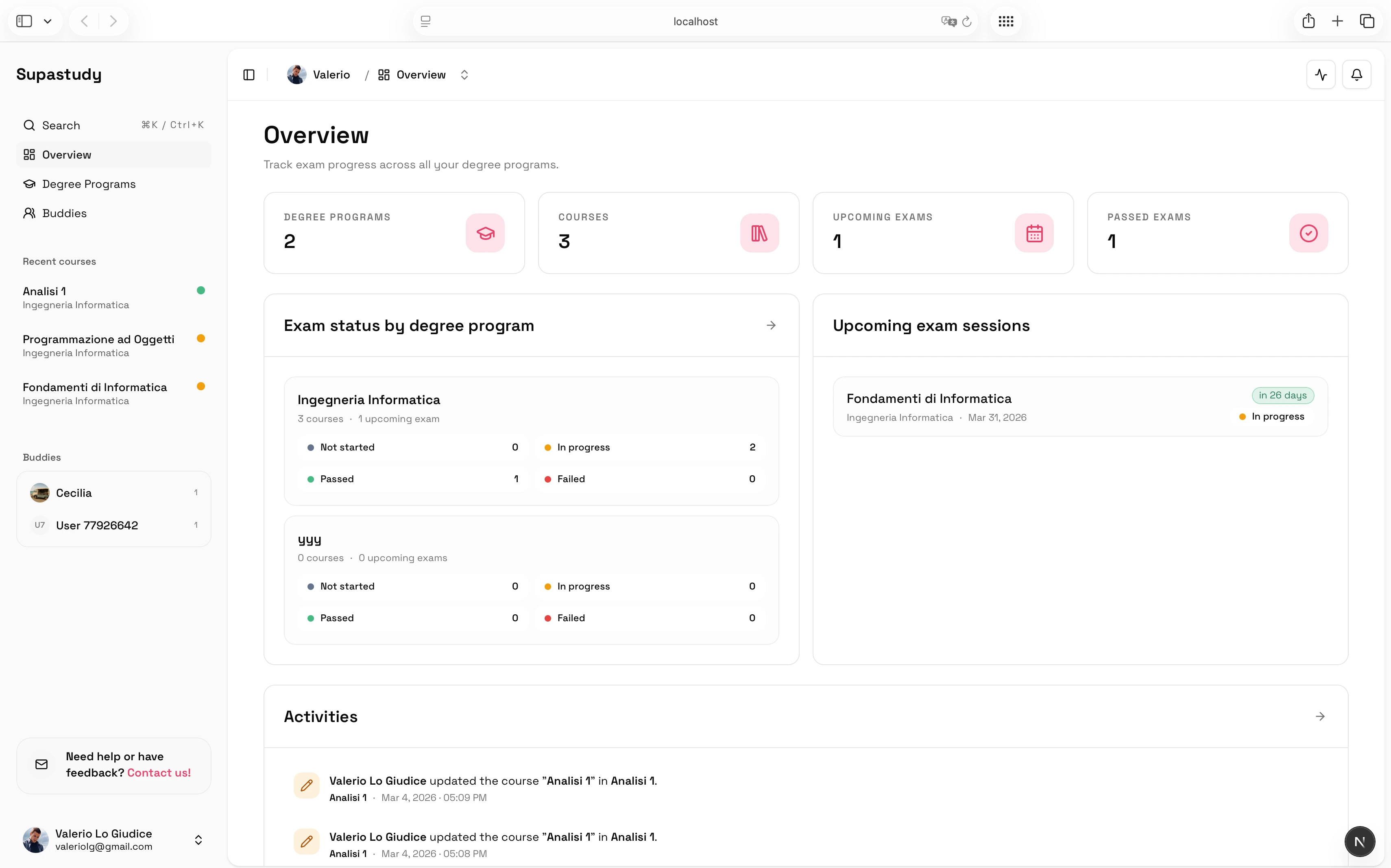
See the full course plan at a glance
Track topics, materials, and recent updates in one view so you always know what is ready and what still needs work.
Notes, questions, and files stay connected
Topic notes
Linked inside chapters
Mentions
Direct course updates
Exam folder
Past papers and slides
Revision note
Saved in the right topic
Shared files
Stored in course folders
Imported outline
Turned into course topics
Followed topic
Track new material
Topic tree
Course structure view
Open questions
Waiting for answers
Accepted answer
Resolved doubt
Study group
Shared course members
Linked material
Easy to revisit later
Each course keeps your study material connected
Open a topic and you can review the notes, files, and questions tied to that part of the syllabus instead of hunting through folders, docs, and chat threads.
Following
Follow the updates that matter in a shared course
That keeps classmates aligned without turning every course into a noisy feed.
New note linked to Course outline
Accepted answer added to Open question
You were mentioned in Shared course
Follow questions and topics without missing important updates
In a shared course, important updates should be easy to spot instead of buried in activity.

Stay in sync
The right updates reach you without the noise
Made for real university study workflows
For exam preparation
Map the syllabus, track open questions, and see what still needs review before exam day.
For shared course materials
Store lecture slides, PDFs, and past papers in course folders, then link them to the right topic.
For collaborative note-taking
Build shared notes with classmates without losing the course structure.
For study group coordination
Invite classmates, follow updates, and keep one shared course moving forward.
Why not just use cloud folders and generic notes apps?
Generic tools are flexible, but they are not designed around courses, topics, and exam prep.
Generic tools
Materials spread across folders and documents
No shared structure for chapters and subtopics
Questions and answers get lost across disconnected tools
It is hard to see what still needs work before exams
Supastudy
Map each course into a topic tree
Keep notes, files, and questions tied to the right topic
See what still needs notes, answers, or review before exams
Study with classmates in shared courses
You can still upload your PDFs and documents, but now they live inside a study planner designed for university courses.
Start free, upgrade when you need shared courses and more capacity
Start with the core planning tools. Paid plans unlock more storage, unlimited courses, and shared course collaboration with classmates.
Free plan
Organize one degree program and one course with the core study-planning tools.
- 1 degree program
- 1 course
- 500 MB file storage
- No shared courses or collaboration with classmates
Paid plans
Unlock unlimited courses, more storage, and shared course collaboration with classmates.
- Unlimited degree programs
- Unlimited courses
- 5 GB file storage
- Shared courses and collaboration with classmates
Student feedback
Trusted by students studying solo and with classmates
Students use Supastudy to map syllabi, organize shared materials, and keep exam prep on track.
“Supastudy finally gave our study group one place for notes, files, and open questions. We stopped wasting time digging through chat threads.”
SW
Sarah W.
“I built my whole exam plan inside topic trees and linked every resource to the right chapter. Revision week felt much more under control.”
JF
John F.
“The shared course workspace made it obvious what still needed notes and what had already been covered. That clarity saved us a lot of stress.”
LP
Lauren P.
“Supastudy finally gave our study group one place for notes, files, and open questions. We stopped wasting time digging through chat threads.”
SW
Sarah W.
“I built my whole exam plan inside topic trees and linked every resource to the right chapter. Revision week felt much more under control.”
JF
John F.
“The shared course workspace made it obvious what still needed notes and what had already been covered. That clarity saved us a lot of stress.”
LP
Lauren P.
“I used to keep PDFs, summaries, and questions in different apps. Now everything lives in the same place and is attached to the right topic.”
KT
Karen T.
“Following questions and getting notified when friends answered them made collaborative revision much faster than our old workflow.”
ER
Emily R.
“The structure is what sold me. It feels built for real university courses instead of forcing me to adapt generic note apps to exam prep.”
DK
David K.
“I used to keep PDFs, summaries, and questions in different apps. Now everything lives in the same place and is attached to the right topic.”
KT
Karen T.
“Following questions and getting notified when friends answered them made collaborative revision much faster than our old workflow.”
ER
Emily R.
“The structure is what sold me. It feels built for real university courses instead of forcing me to adapt generic note apps to exam prep.”
DK
David K.
“Our class finally has a clean way to share lecture slides and tag them to the chapters they belong to. It is simple and actually sticks.”
MD
Mike D.
“I like that I can study alone during the week and still bring classmates into the same course when we need to prepare together.”
AB
Alex B.
“Supastudy made my final review sessions feel focused. I always knew which topics still lacked notes, files, or clear answers.”
JT
Jessica T.
“Our class finally has a clean way to share lecture slides and tag them to the chapters they belong to. It is simple and actually sticks.”
MD
Mike D.
“I like that I can study alone during the week and still bring classmates into the same course when we need to prepare together.”
AB
Alex B.
“Supastudy made my final review sessions feel focused. I always knew which topics still lacked notes, files, or clear answers.”
JT
Jessica T.
Create your first course and study with a clear plan
Stop losing notes, questions, and files across disconnected tools. Build a course plan that helps you study on your own and prepare with classmates when you need to.

One course
Everything stays connected